Usage
Tools
The Bugsee MCP server exports fourteen tools across four resource families. All are read-only except create_application, which creates a new application, and trigger_build_vuln_scan, which queues a vulnerability scan against an existing build.
| Family | Tool | Purpose |
|---|---|---|
| Applications | list_applications | Discover application keys |
| Applications | create_application | Create a new application and return its app_token (mutating) |
| Issues | list_issues | Paginated issue listing with filters |
| Issues | get_issue | Full issue report with optional logs, attributes, and per-thread stacks |
| Issues | get_issue_resource | Presigned URL for an issue resource (video, screenshot, network log, attachment, native crash artifact, …) |
| Builds | list_builds | Paginated build listing with filters |
| Builds | list_latest_builds | One build per (package_id, format, build_configuration) lineup |
| Builds | get_build | Single build, light by default with opt-in heavy fields |
| Builds | get_build_by_commit | Build lookup by VCS commit SHA |
| Builds | get_build_regressions | Flat regression view: size / deps / timings vs baseline |
| Builds | list_build_vulnerabilities | Vulnerability-scan summary + diff for a build |
| Builds | trigger_build_vuln_scan | Queue a vulnerability scan against a build (mutating) |
| Symbols | list_symbols | Browse debug files uploaded for an application |
| Symbols | get_symbol_by_uuid | Diagnose missing symbols by module / debug UUID |
list_applications
List all applications accessible to the current user. Takes no parameters.
Response fields:
| Field | Description |
|---|---|
id | Application ID (Mongo ObjectId hex) |
key | Application key used in issue keys (e.g., MYAPP in MYAPP-123) |
name | Display name |
description | Free-form description (may be empty) |
type | Platform: ios, android, javascript, rust, or web (web is legacy — retained for existing applications, not creatable) |
subtype | Wrapper / framework if any. Mobile wrappers: react_native, flutter, unity, dotnet, xamarin, cordova, kmp. JavaScript targets: react, vue, angular, nextjs, node, express, browser, and other supported frameworks/runtimes. Empty for native apps |
Use this tool first when the agent doesn't yet know which application key to query.
create_application
Create a new application in the current organization and return it, including the app_token you need to initialize an SDK. Useful when the agent is onboarding a project end to end — scaffold the app, then wire the token straight into the SDK launch() call.
This tool writes. It requires the mcp:write OAuth scope and either organization admin or an explicit app_create permission — the scope alone is not sufficient. A client holding only mcp:read cannot call it. See Security.
Parameters:
| Parameter | Type | Required | Description |
|---|---|---|---|
name | string | Yes | Display name of the application. |
key | string | Yes | Application key, used as the issue-key prefix (e.g. "MYAPP" produces issues MYAPP-123). |
type | string | Yes | Platform: ios, android, javascript, or rust. |
subtype | string | No | Wrapper / framework, when the platform is a host for one — e.g. react_native, flutter, unity, react, nextjs, node. |
description | string | No | Free-form description. |
The returned app_token is a credential: it authorizes SDK builds to report into this application. Treat agent transcripts that contain it accordingly.
list_issues
List issues for a given application, including unsymbolicated (missing-symbols) crashes and errors alongside ready ones. Returns a paginated response (50 issues per page).
Parameters:
| Parameter | Type | Required | Description |
|---|---|---|---|
application_id_or_key | string | Yes | The application ID or key (e.g., "MYAPP") |
type | string | No | Filter by issue type: "bug", "error", or "crash" |
status | string | No | Filter by issue open/closed state (not symbolication status): "open" or "closed" |
version | string | No | Filter by application version (e.g., "1.2.3") |
reporter_email | string | No | Filter by reporter email address |
sort | string | No | Sort order. One of: "date_desc" (default), "date_asc", "events_desc", "events_asc", "users_desc", "users_asc" |
cursor | string | No | Pagination cursor from a previous response to fetch the next page |
Response fields:
issues— array of issues, each containingid,key,type,status,symbolication_status,severity,summary,created_on,updated_on; plusevents_countandusers_countfor crashes/errors, ordescriptionfor bugstotal— total number of matching issuesnextCursor— present if more pages exist; pass it ascursorto fetch the next page
symbolication_status is "ready" when the issue is symbolicated (or needs no symbols) and "missing_sym" when it is still waiting on debug symbols or source maps. Unsymbolicated issues often have an empty key until symbols are uploaded and processing completes — in that case pass the id field to get_issue / get_issue_resource as issue_id rather than issue_key, and use get_symbol_by_uuid to find out what is missing.
Log data is not available from this tool — use get_issue with include_logs for that.
get_issue
Get a single issue by its key (e.g., "MYAPP-123") or by its ID. Returns a plain-text report with markdown sections covering timing, environment, summary, exception details, and optionally per-thread stacks, app-defined attributes, and logs.
Parameters:
| Parameter | Type | Required | Description |
|---|---|---|---|
issue_key | string | Conditional | The issue key in "APPKEY-NUMBER" format (e.g., "MYAPP-123"). Required unless issue_id is given. Use list_issues first to discover available keys. |
issue_id | string | Conditional | Mongo ObjectId hex of the issue — the id field from list_issues. Required unless issue_key is given. Prefer this for unsymbolicated (missing_sym) issues, which have an empty key. |
include_all_threads | boolean | No | When true, include stack traces for all threads in the crash dump, not just the crashed/target thread. Useful for diagnosing deadlocks, thread-related crashes, or cases where the crashed thread alone does not explain the failure. Native iOS/Android dumps may contain dozens of threads, so response size grows accordingly. No effect on bug-type issues. Default: false. |
include_attributes | boolean | No | When true, add an Attributes section with the app-defined key/value context the SDK attached to the session (set through setAttribute — user tier, feature flags, tenant, …). Useful when the failure looks configuration- or account-dependent. Attributes are unbounded and app-defined, so an app that attaches many of them grows the response accordingly. Default: false. |
include_logs | object | No | Log filter configuration. If omitted, logs are not included. See below. |
Log filter options (include_logs):
| Parameter | Type | Description |
|---|---|---|
entries | string | Required. Which log entries to include: "all", "errors", or "range". |
max_log_entries | number | Maximum number of log entries to return. For "all", keeps the last N entries (closest to crash). For "errors" and "range", keeps the first N. Recommended: start with 50–100 for initial triage. |
deduplicate_errors | boolean | When true and entries="errors", groups identical error messages and returns a count summary. |
errors_surrounding | object | Context around error entries (only with entries="errors"). Fields: entries_before, entries_after (number of entries), time_before, time_after (milliseconds). |
range | object | Range specification (only with entries="range"). Fields: from_index, to_index (entry positions), from_time, to_time (timestamps in ms). |
- Call
get_issuewithoutinclude_logsto inspect the issue first. - If logs are needed, use
entries="errors"withdeduplicate_errors=trueormax_log_entriesto limit output. - Use
entries="all"only when you specifically need the full session log.
Response sections:
- Issue timing — start/end timestamps
- Environment — device, OS, app version (YAML format)
- Runtime — React Native, Flutter, Unity, etc. (if applicable)
- Summary — issue title
- Description — bug reports only
- Labels — labels the SDK attached to the report, when there are any
- Attributes — app-defined key/value context; only when
include_attributes=true - Report source — how the report was triggered (screenshot, shake, crash,
code_upload, …), plus the capture mechanism and the calling code's origin when the SDK reported them. Readsnot reportedfor SDK builds that predate trigger reporting. - Exception — crash/error type, signal, reason, stack trace of the crashed/target thread
- All threads — only when
include_all_threads=true; one subsection per thread with the crashed thread marked - Memory leak analysis — only when the issue carries a memory/thread-leak bundle (leaks arrive as
error-type issues); covers the leaking class, retained size, GC-root reference chain, and a memory snapshot - Logs — only when
include_logsis provided
get_issue_resource
Returns a presigned, time-limited (24h) URL for a specific resource attached to an issue. Use this for content get_issue does not surface inline — raw video of the session, the captured screenshot, the full network traffic log, user-supplied attachments, or low-level native crash artifacts.
For "attachment" the response always contains a list (an issue may carry multiple attachments). For every other type a single entry is returned.
Parameters:
| Parameter | Type | Required | Description |
|---|---|---|---|
issue_key | string | Conditional | The issue key in "APPKEY-NUMBER" format. Required unless issue_id is given. |
issue_id | string | Conditional | Mongo ObjectId hex of the issue — the id field from list_issues. Required unless issue_key is given. Prefer this for unsymbolicated issues, which have an empty key. |
resource_type | string | Yes | One of: "video", "screenshot", "log", "network", "breadcrumbs", "viewtree", "input", "events.system", "events.user", "traces.system", "traces.user", "attachment", "crash", "minidump", "crash.trace", "crash.tombstone", "performance", "memory.leak". |
For text-based log analysis prefer get_issue with include_logs — it returns filtered log entries inline without an HTTP fetch round trip. The "memory.leak" bundle is also rendered inline by get_issue (the Memory leak analysis section); fetch it via this tool only when you need the raw structured JSON.
list_builds
List builds for a given application. Returns a paginated response (50 builds per page) of light per-build records.
Parameters:
| Parameter | Type | Required | Description |
|---|---|---|---|
application_id_or_key | string | Yes | The application ID or key. |
size_analysis_status | string | No | Filter by size-analysis pipeline status: "uploading", "processing", "ready", "failed", "unavailable". |
format | string | No | Filter by artifact format: "aab", "apk", "ipa". |
build_configuration | string | No | Filter by build configuration (e.g., "release", "debug"). |
version | string | No | Filter by application version string. |
package_id | string | No | Filter by package identifier (e.g., "com.example.app"). |
query | string | No | Free-text search across version, package_id, uuid, and build_configuration (case-insensitive substring). |
sort | string | No | Sort order. One of: "date_desc" (default), "date_asc", "size_desc", "size_asc". |
cursor | string | No | Pagination cursor from a previous response. |
Per-build fields (light projection):
| Field | Description |
|---|---|
id | Build ID (Mongo ObjectId hex) |
uuid | Plugin-supplied build UUID; stable across re-uploads; empty when unset |
package_id, version, build, build_configuration | Identification |
format | "aab", "apk", "ipa", or empty |
size_analysis_status | Size-analysis pipeline state |
vuln_scan_status | Vulnerability-scan state ("never", "queued", "scanning", "ready", "failed") |
artifact_size | Raw artifact byte count; 0 when unknown |
size_diff_artifact_trend | "regression", "improvement", "unchanged", or empty when no baseline |
has_size_summary, has_size_diff_summary, has_vuln_scan_summary | Discoverability flags — true when get_build can return the corresponding heavy field |
vcs_commit_sha, vcs_branch, created_on | VCS and timing |
Use list_builds first to discover build IDs and surface status; then use get_build (with include) for full summaries on the builds the user asks about.
list_latest_builds
Returns the latest build per lineup — one entry per (package_id, format, build_configuration) tuple — within an application. Same per-build shape as list_builds.
Parameters:
| Parameter | Type | Required | Description |
|---|---|---|---|
application_id_or_key | string | Yes | The application ID or key. |
limit | number | No | Cap on lineups returned. Default 50, max 200. |
When to prefer this over list_builds: the user asks "what's the current state?", "which apps need attention?", "show me the latest release of each variant", or any other question that wants a snapshot of the head of every release line. list_builds is for paging through history or filtering by version / status / commit; list_latest_builds is for one-row-per-lineup current-state queries.
get_build
Fetch a single build by ID. By default returns the light projection — identification (id, uuid, package_id, version, build, build_configuration, format), pipeline status (size_analysis_status, dependencies_status, timings_status, vuln_scan_status), the size headline (artifact_size, size_diff_artifact_trend), VCS metadata (vcs_commit_sha, vcs_branch, vcs_provider, vcs_repo), timestamps (created_on, updated_on, vuln_scan_at), and the has_* discoverability flags telling you which heavy summaries exist on the build. Heavy fields are opt-in via the include array — supply only the tags you need to keep token usage flat.
Parameters:
| Parameter | Type | Required | Description |
|---|---|---|---|
application_id_or_key | string | Yes | The application ID or key. |
build_id | string | Yes | Build ID — typically obtained via list_builds. |
include | string[] | No | Heavy fields to include. See tags below. Default: empty (light only). |
Include tags:
| Tag | Adds |
|---|---|
"size_summary" | Size analysis (artifact bytes, install size, breakdown by category, …) |
"size_diff_summary" | Size regression vs the baseline build |
"dependencies_summary" | Dependency mix on this build |
"dependencies_diff_summary" | Dependency added/removed/changed vs the baseline |
"timings_diff_summary" | Build-timings regression (per-task wall-clock deltas) |
"vuln_scan_summary" | Vulnerability counts (critical/high/medium/low/info), sources, scanned-at |
"vuln_scan_diff_summary" | New/resolved/unchanged vuln counts vs the previous scan of this build |
"build_metadata" | Gradle/CocoaPods metadata |
"urls" | Presigned S3 URLs for the detail blobs |
"all" | Shorthand for every tag above |
For the flat "did this regress?" answer prefer get_build_regressions. For vulnerability-specific queries prefer list_build_vulnerabilities. get_build is the full-detail catch-all.
get_build_by_commit
Look up the build associated with a specific VCS commit SHA within an application. Useful when the user references a build by its commit ("the build for commit abc1234"). Returns the light projection — call get_build with the returned ID for full detail. Returns a not-found error when no build carries that commit.
Parameters:
| Parameter | Type | Required | Description |
|---|---|---|---|
application_id_or_key | string | Yes | The application ID or key. |
commit_sha | string | Yes | VCS commit SHA (7–64 hex characters). |
get_build_regressions
Surface size / dependencies / timings regressions for a build vs its baseline in a single flat response. Cheaper than get_build + multiple include tags when the agent just needs the "did this regress?" answer.
Parameters:
| Parameter | Type | Required | Description |
|---|---|---|---|
application_id_or_key | string | Yes | The application ID or key. |
build_id | string | Yes | Build ID. |
Response shape:
build_id— echoedhas_regressions—truewhen at least one ofsize/deps/timingscarries a baseline-comparison summarysize—{ present: false }when no baseline, otherwisepresent: trueplusartifact_trend("regression"/"improvement"/"unchanged"),artifact_size_delta,artifact_size_pct,download_size_delta,download_size_pct,install_size_delta,install_size_pct,base_artifact_size,incomparable_tree,base_build_iddeps—{ present: false }or{ present: true, compatible, incompatible_reason, added_count, removed_count, changed_count, unchanged_count, base_build_id }timings—{ present: false }or{ present: true, compatible, incompatible_reason, previous_wall_clock_ms, current_wall_clock_ms, wall_clock_delta_ms, regressed_count, improved_count, added_count, removed_count, unchanged_count, base_build_id }
list_build_vulnerabilities
Surface the vulnerability-scan summary for a build. Severity-bucket counts, scan status and last-scanned timestamp, the optional diff vs the previous scan of the same build, and a presigned URL the agent can fetch via HTTP for per-CVE detail.
Parameters:
| Parameter | Type | Required | Description |
|---|---|---|---|
application_id_or_key | string | Yes | The application ID or key. |
build_id | string | Yes | Build ID. |
Response shape:
| Field | Description |
|---|---|
build_id | Echoed build ID |
vuln_scan_status | "never", "queued", "scanning", "ready", "failed" |
vuln_scan_at | ISO 8601 timestamp of the most recent scan; empty when never scanned |
summary.scanned_at | ISO 8601 timestamp of the scan |
summary.sources | Vuln databases queried (e.g. ["osv", "github_advisory"]) |
summary.total | Total advisories across the resolved dep graph |
summary.critical / high / medium / low / info | Counts per severity |
summary.affected_entries_count | Distinct dependencies that carry at least one advisory |
diff_summary | null on the first scan, otherwise { previous_scanned_at, new_count, resolved_count, unchanged_count } |
full_findings_url | Presigned S3 URL for per-advisory detail (advisory IDs, affected paths, fix versions); empty when not yet produced |
Prefer this over get_build + include: ["vuln_scan_summary"] when the question is specifically about vulnerabilities — the response shape is flattened for direct consumption. Use the summary counts in-band; only fetch full_findings_url when the user asks for specific CVEs.
trigger_build_vuln_scan
Queue a vulnerability scan against a specific build's resolved dependency graph (OSV + GitHub Advisory). The scan runs asynchronously in the worker; this tool returns as soon as the build is admitted to the queue.
This is one of two mutating tools the MCP server exports (the other is create_application). It writes the build doc and enqueues a worker message. It is not idempotent — repeated calls within the cooldown window are rejected, not no-op. Trigger only when the agent (or the user) has a concrete reason: the user explicitly asks for a re-scan, the advisory databases were just refreshed, or the build has never been scanned and the user wants vulnerability data.
Parameters:
| Parameter | Type | Required | Description |
|---|---|---|---|
application_id_or_key | string | Yes | The application ID or key. |
build_id | string | Yes | Build ID. |
Response: soft-outcome envelope. Rather than failing hard for expected business states, the response carries an outcome discriminator the agent should branch on:
outcome | Meaning | Side fields |
|---|---|---|
"queued" | Accepted, worker will scan shortly. | vuln_scan_status="queued", build_id |
"not_found" | Either the application could not be resolved from the key, the resolved organization has no applications, or no such build exists under the resolved application. The message field disambiguates. | — |
"dependencies_not_ready" | dependencies_status != "ready"; the deps pipeline must complete first. Read get_build to learn the current dependencies_status. | — |
"already_in_progress" | A scan is currently queued / scanning. Do not re-trigger — poll for the result via list_build_vulnerabilities or get_build. | — |
"cooldown" | A recent scan blocked this trigger. retry_after_minutes tells the agent how long to wait. cooldown_reason is "success_cooldown" (3h after a successful scan) or "failure_backoff" (shorter window after a failed attempt). | retry_after_minutes, cooldown_reason |
"invalid_input" | Input failed validation (typically a malformed build_id, or another input-validation rejection from the service). | — |
"access_denied" | User lacks modify permission on the application. | — |
After a "queued" response, poll list_build_vulnerabilities (or get_build with include: ["vuln_scan_summary"]) to read the result — the scan typically completes within a few minutes.
list_symbols
List debug files uploaded for a given application — dSYM, ELF, PDB, R8/ProGuard mapping, source map, or il2cpp line-map. Returns a paginated response (50 symbols per page, newest first by default). Shared system symbols are not included; use get_symbol_by_uuid to look up a specific module UUID (including system symbols).
Parameters:
| Parameter | Type | Required | Description |
|---|---|---|---|
application_id_or_key | string | Yes | The application ID or key (e.g., "MYAPP"). |
query | string | No | Free-text search. Matches symbol name by case-insensitive substring, and image UUID by full id only (with or without dashes, upper or lower case). A partial UUID matches nothing, which does not mean it is missing — for a UUID lookup use get_symbol_by_uuid. |
status | string | No | Filter by pipeline status: "uploading", "processing", "ready", or "broken". |
sort | string | No | Sort order by creation date. One of: "date_desc" (default), "date_asc". |
cursor | string | No | Pagination cursor from a previous response. Must be sent with the same application_id_or_key, query, status, and sort that produced it; a mismatched or invalid cursor is rejected. |
Response fields:
symbols— array of records, each containingid,name,version,build,format,status,system,path,transform,images(uuid + arch),raw_sizeandcompressed_size(bytes),uploaded_on,created_ontotal— total number of matching symbolsnextCursor— present if more pages exist; pass it ascursorto fetch the next page
Use this tool to browse or filter what is uploaded for an app. Use get_symbol_by_uuid when you already have a module / debug UUID.
get_symbol_by_uuid
Look up debugging symbols by module UUID — a dSYM, ELF, PDB, R8/ProGuard mapping, source map, or il2cpp line-map debug id. This is a diagnostic tool: it returns every matching symbol file in any status (uploading, processing, ready, broken, deleted), not just the ready ones, which is what makes it useful for investigating missing_sym markers and unsymbolicated frames.
Parameters:
| Parameter | Type | Required | Description |
|---|---|---|---|
uuid | string | Yes | Module / debug UUID taken from a crash frame or a symbol upload. Any spelling is accepted: with or without dashes, upper or lower case. |
application_id_or_key | string | No | Narrows org-owned matches to one application. When set, read access to that application is asserted before the lookup. System symbols are still included. |
Interpreting the result:
- An empty
symbolsarray means either nothing is uploaded for that UUID in the organization, or matches exist only on applications the caller cannot read. It is not proof that an upload is missing — do not report it as one. - Multiple entries mean co-resident formats sharing a single module UUID (for example
elfplusil2cpp-linemap), which is expected rather than a duplicate-upload bug. - System symbols are always included when present.
Without application_id_or_key, org-owned hits are still limited to applications the caller can read.
Example prompts by workflow
The patterns below are what most users will write into their agent of choice. They map naturally onto the tools above, so an MCP-aware model can handle them without any custom wiring on your side.
1. Triage overnight crashes
Start the day knowing which crashes spiked or are blocking the most users — without leaving the editor for the dashboard.
"Show me the open crashes in MyApp from the last 24 hours, sorted by affected users."
"List the top 5 crashes in MyApp version 1.2.3 by event count."
2. Root-cause a single crash report
Take a specific issue key (often from support or a webhook notification), pull the full crash dump, and let the agent map the stack trace onto your source files.
"Pull up MYAPP-1234 with the error log from the 5 seconds before the crash, then read the files in the stack trace and explain what's going wrong."
"Get MYAPP-4567 including all threads — I think we're deadlocking on the main thread."
The second example uses include_all_threads=true, which adds an "## All threads" section to the response — useful when the crashed thread alone doesn't explain the failure.
3. Regression hunting across releases
Diff issues between two versions of the app to spot what's new in the next build.
"What crash types appeared in MyApp 1.2.2 that didn't exist in 1.2.1? Show me counts."
"Compare the open issues in MyApp 1.2.2 vs 1.2.3 — which ones are new in 1.2.3?"
The agent issues two list_issues calls (one per version filter) and diffs the results. Follow up with "now pull the full crash for each new one and find the suspect commit" to chain get_issue calls.
4. Bug report to code change
Turn a user-submitted bug report into a proposed fix in the same conversation.
"Show me the latest 5 bug reports in MyApp from real users. For each, look at the relevant files and suggest a fix."
"Find bug reports in MyApp mentioning 'login' filed by jane@example.com — pull the most recent and explain how I'd fix it."
list_issues filtered by type="bug" plus reporter_email scopes down to user-submitted reports; get_issue returns the description and device context; the agent proposes the fix against your working tree.
5. Snapshot the head of every release line
When the user asks "what's the current state?" or "show me the latest of each variant", the agent should reach for list_latest_builds rather than list_builds — the former returns one row per lineup (package_id × format × build_configuration), which is what most "current state" questions want.
"List the latest release build of every variant of MyApp."
"What's the current head of each lineup in MyApp? Highlight any with vulnerabilities."
6. Did this build regress?
Use get_build_regressions for a flat answer across size, dependencies, and timings vs the build's baseline. Avoid get_build with multiple include tags unless the user wants the raw summary blobs.
"Did build 65ab… regress vs its baseline? Show size, dependency, and timing deltas."
"Find me the latest release build of MyApp and tell me whether it's a regression."
The second prompt chains list_latest_builds → get_build_regressions.
7. Trace a build from a commit
When the user mentions a commit SHA, use get_build_by_commit instead of paging through list_builds.
"What does the build for commit a1b2c3d look like? Did size or dependencies change?"
The agent calls get_build_by_commit then chains get_build (with include: ["size_diff_summary", "dependencies_diff_summary"]) or get_build_regressions on the returned ID.
8. Audit a build's vulnerabilities
list_build_vulnerabilities returns the flattened severity counts plus a diff vs the previous scan of the same build — typically enough to answer "did this introduce new vulns?". For per-CVE detail, fetch the presigned full_findings_url.
"How many vulnerabilities are in the latest release build of MyApp? Are any new vs the previous scan?"
"List the critical and high CVEs in build 65ab… — I need the advisory IDs."
The first prompt is answered entirely from the in-band counts. The second triggers an HTTP fetch of full_findings_url.
9. Re-scan a build for fresh advisories
If the user wants to re-check a build against the current advisory databases (e.g. a new OSV publication just landed), the agent calls trigger_build_vuln_scan. Read the outcome field to decide the next move:
"Trigger a fresh vulnerability scan on the latest release build of MyApp and let me know when it's done."
A "queued" outcome means the agent should poll list_build_vulnerabilities after a few minutes. "cooldown" means wait retry_after_minutes. "already_in_progress" means another scan is in flight — poll, don't re-trigger.
10. Diagnose an unsymbolicated crash
When list_issues returns an issue with symbolication_status="missing_sym" and an empty key, the agent fetches it by issue_id and checks which module is missing symbols.
"MyApp has crashes that aren't symbolicated — pull one and tell me which symbol file we forgot to upload."
"Is anything uploaded for debug UUID 8A3F1C2E-…? Show me its status."
"List the debug symbols uploaded for MyApp that are still processing or broken."
list_symbols browses what is uploaded for the app (status, format, UUIDs). get_symbol_by_uuid returns matches in any status, including system symbols that list_symbols omits, so it distinguishes "never uploaded" from "uploaded but still processing" or "broken" — the usual reason a crash sits in missing_sym.
11. Onboard a new app
With the mcp:write scope granted, the agent can create the application and wire the SDK in one pass.
"Create a Bugsee app called Checkout Service for iOS with key CHECKOUT, then add the SDK launch call to my AppDelegate using the returned token."
create_application returns the app_token, which the agent drops straight into the SDK initialization in your working tree. This still requires organization-admin (or app_create) rights on your account.
Worked example
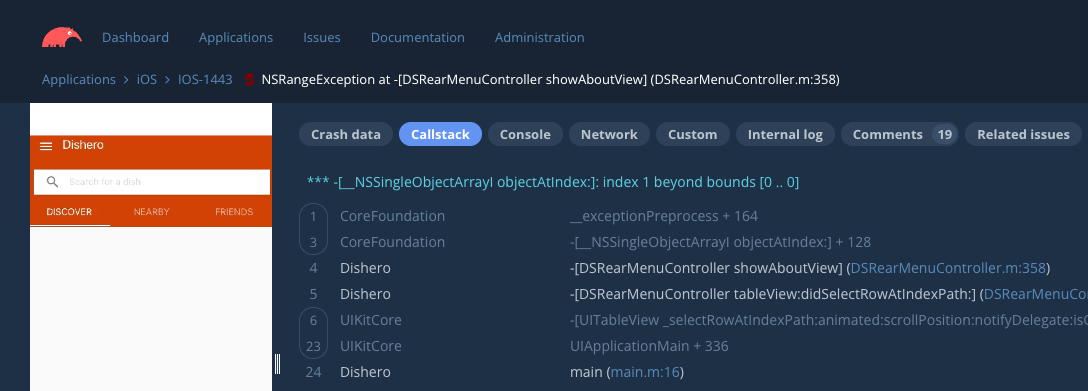
A crash was deliberately planted within a test iOS app that had Bugsee pre-configured. Once triggered, the crash was intercepted and symbolicated by Bugsee, and a new issue was created (IOS-1443):
Having a working folder open in Cursor, and the Bugsee MCP server configured, using it is as simple as asking the agent:
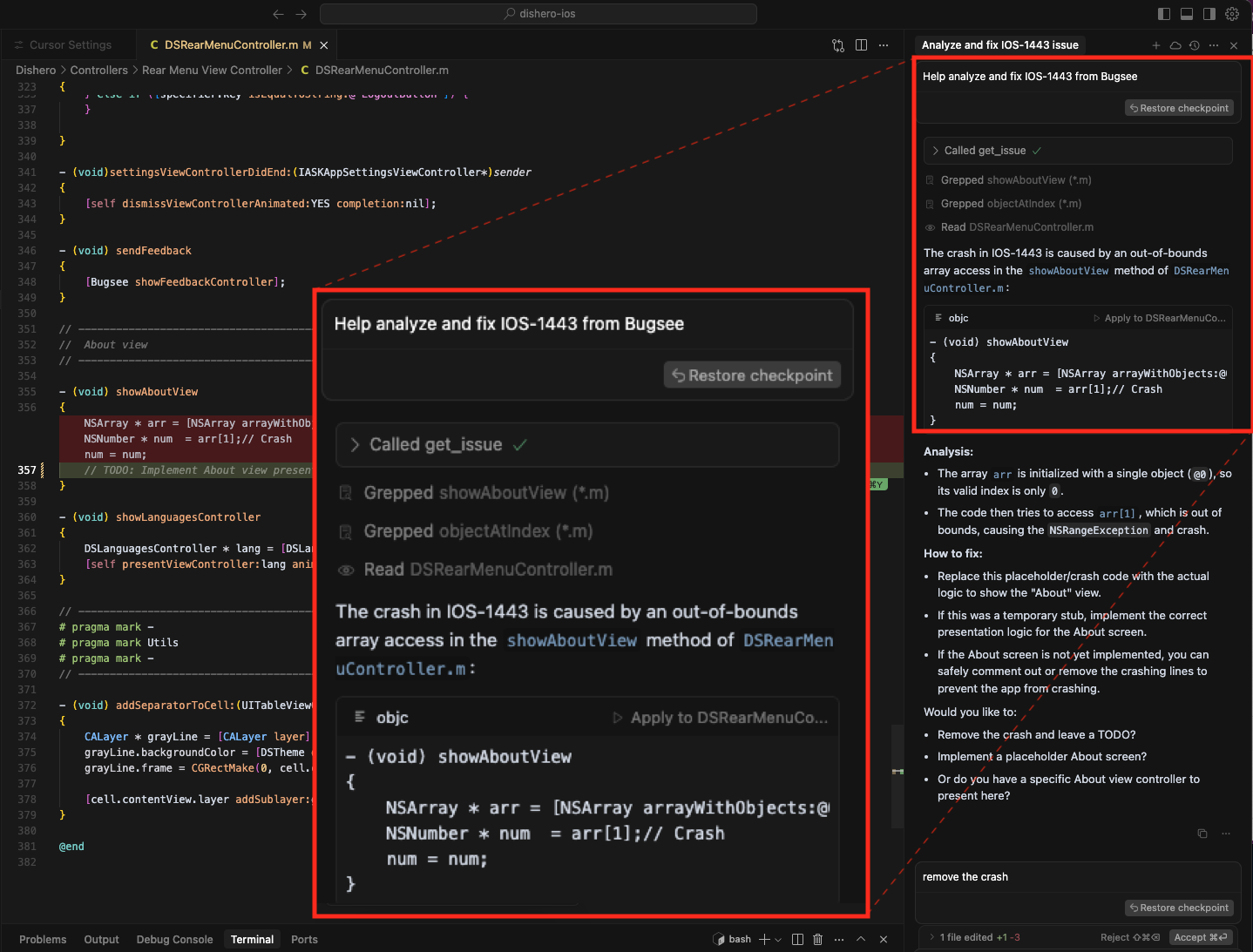
"Help analyze and fix IOS-1443 from Bugsee."
Cursor fetches the full context (stack traces, environment, optional logs) from the Bugsee MCP server, locates the relevant files and methods in the workspace, analyzes the issue, and proposes a fix: