Usage
Tools
The Bugsee MCP server exports the following tools for AI agents:
list_applications
List all applications accessible to the current user. This tool takes no parameters and returns the applications available under your account. Use it to discover application keys before querying issues.
list_issues
List issues for a given application. Returns a paginated response (50 issues per page) with issue metadata.
Parameters:
| Parameter | Type | Required | Description |
|---|---|---|---|
application_id_or_key | string | Yes | The application ID or key (e.g., "MYAPP") |
type | string | No | Filter by issue type: "bug", "error", or "crash" |
status | string | No | Filter by issue status: "open" or "closed" |
version | string | No | Filter by application version (e.g., "1.2.3") |
reporter_email | string | No | Filter by reporter email address |
sort | string | No | Sort order. One of: "date_desc" (default), "date_asc", "events_desc", "events_asc", "users_desc", "users_asc" |
cursor | string | No | Pagination cursor from a previous response to fetch the next page |
Response fields:
issues— array of issues, each containingid,key,type,status,severity,summary,created_on,updated_on; plusevents_countandusers_countfor crashes/errors, ordescriptionfor bugstotal— total number of matching issuesnextCursor— present if more pages exist; pass it ascursorto fetch the next page
get_issue
Get a single issue by its key (e.g., "MYAPP-123"). Returns a plain-text report with markdown sections covering timing, environment, summary, exception details, and optionally logs.
Parameters:
| Parameter | Type | Required | Description |
|---|---|---|---|
issue_key | string | Yes | The issue key in "APPKEY-NUMBER" format (e.g., "MYAPP-123"). Use list_issues first to discover available keys. |
include_logs | object | No | Log filter configuration. If omitted, logs are not included. See below. |
Log filter options (include_logs):
| Parameter | Type | Description |
|---|---|---|
entries | string | Required. Which log entries to include: "all", "errors", or "range". |
max_log_entries | number | Maximum number of log entries to return. For "all", keeps the last N entries (closest to crash). For "errors" and "range", keeps the first N. Recommended: start with 50–100 for initial triage. |
deduplicate_errors | boolean | When true and entries="errors", groups identical error messages and returns a count summary. |
errors_surrounding | object | Context around error entries (only with entries="errors"). Fields: entries_before, entries_after (number of entries), time_before, time_after (milliseconds). |
range | object | Range specification (only with entries="range"). Fields: from_index, to_index (entry positions), from_time, to_time (timestamps in ms). |
- Call
get_issuewithoutinclude_logsto inspect the issue first. - If logs are needed, use
entries="errors"withdeduplicate_errors=trueormax_log_entriesto limit output. - Use
entries="all"only when you specifically need the full session log.
Response sections:
- Issue timing — start/end timestamps
- Environment — device, OS, app version (YAML format)
- Runtime — React Native, Flutter, Unity, etc. (if applicable)
- Summary — issue title
- Description — bug reports only
- Exception — crash/error type, signal, reason, stack trace
- Logs — only when
include_logsis provided
Prompts
Note: While most AI agents that support the MCP Protocol also support tools, prompts are less widely adopted and may not be available in your AI agent of choice.
- /bugsee_fix
Usage examples
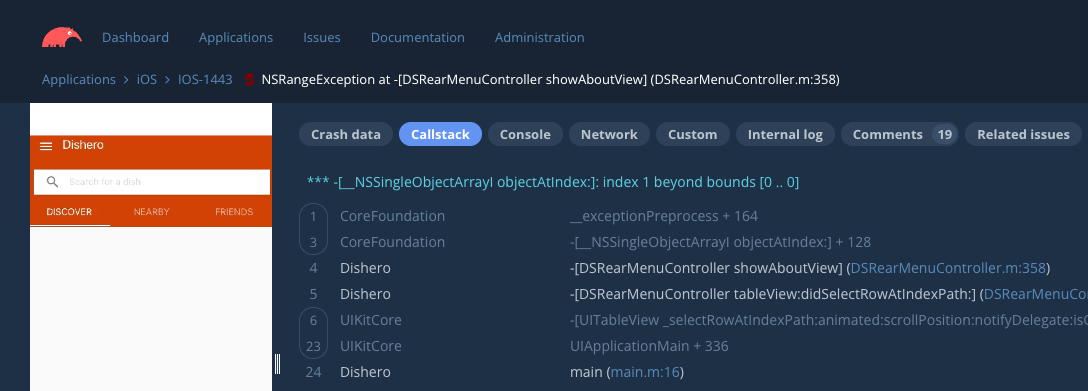
In the following contrived example, a crash was deliberately planted within a test iOS app which had Bugsee pre-configured. Once triggered, a new crash was intercepted and symbolicated by Bugsee and a new issue was created (IOS-1443):
Having a working folder open in Cursor, and having Bugsee MCP Server configured, using it is as simple as just asking the agent to fix the issue using the following prompt:
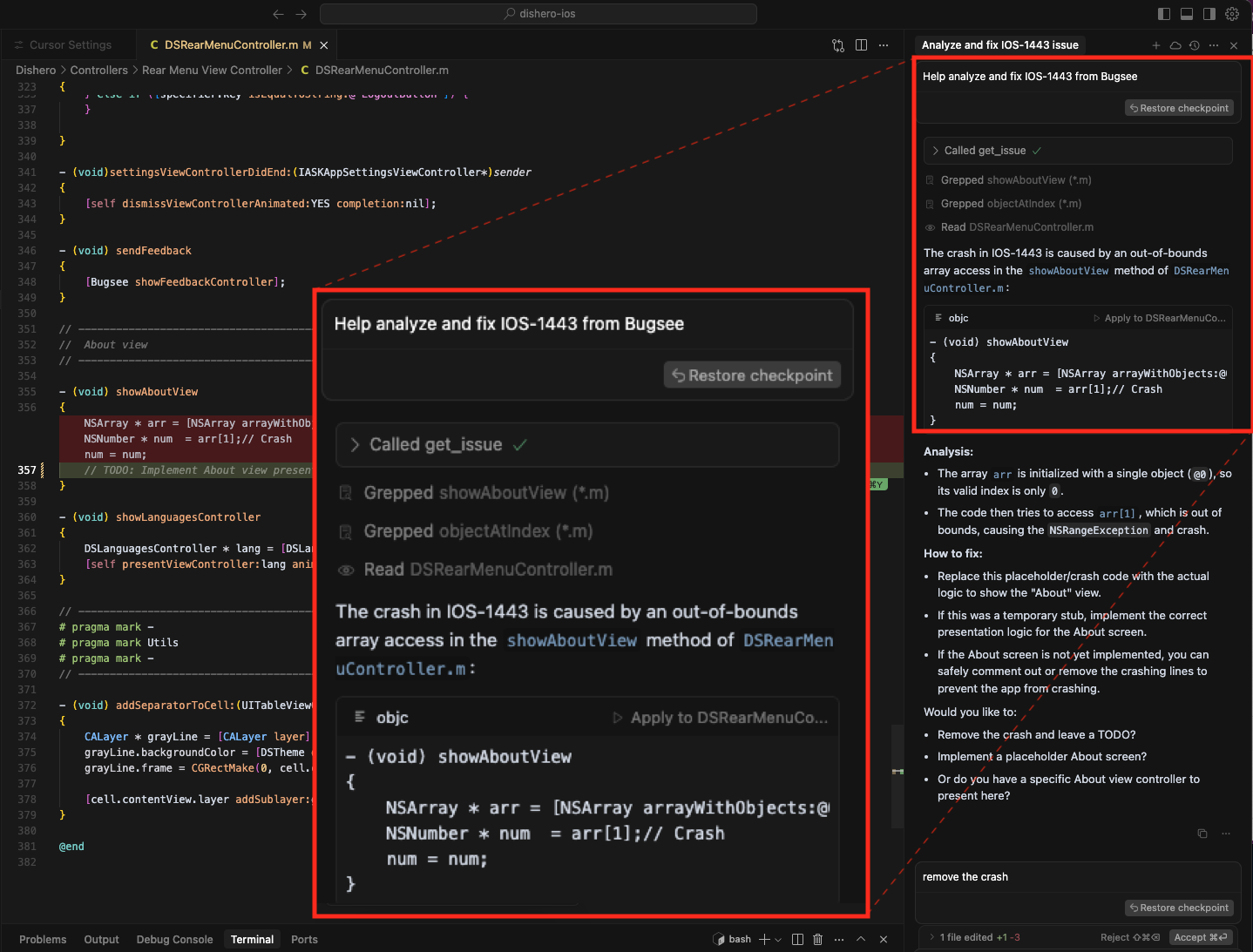
Help analyze and fix IOS-1443 from Bugsee
The result:
Cursor successfully fetches all the relevant context (including the stack traces) from Bugsee MCP tool, locates the relevant files and methods, analyzes the issue and proposes ways to fix it: