Installation
Ask your AI coding assistant:
Use curl to download, read and follow: https://docs.bugsee.com/ai/agent-skills/sdk/ios/SKILL.md
Works with Claude Code, Cursor, Copilot, Codex, and more. Learn more
The recommended way to install Bugsee is to use Swift Package Manager, CocoaPods, or Carthage. You can also add it to your project manually by following the instructions below.
CocoaPods
Add the following line to your project's Podfile.
pod 'Bugsee'
Run the following commands to install the Pod.
pod install
pod update Bugsee # This is important, as the install command does not guarantee you will get the latest version
If you are using CocoaPods you can now skip directly to initialization
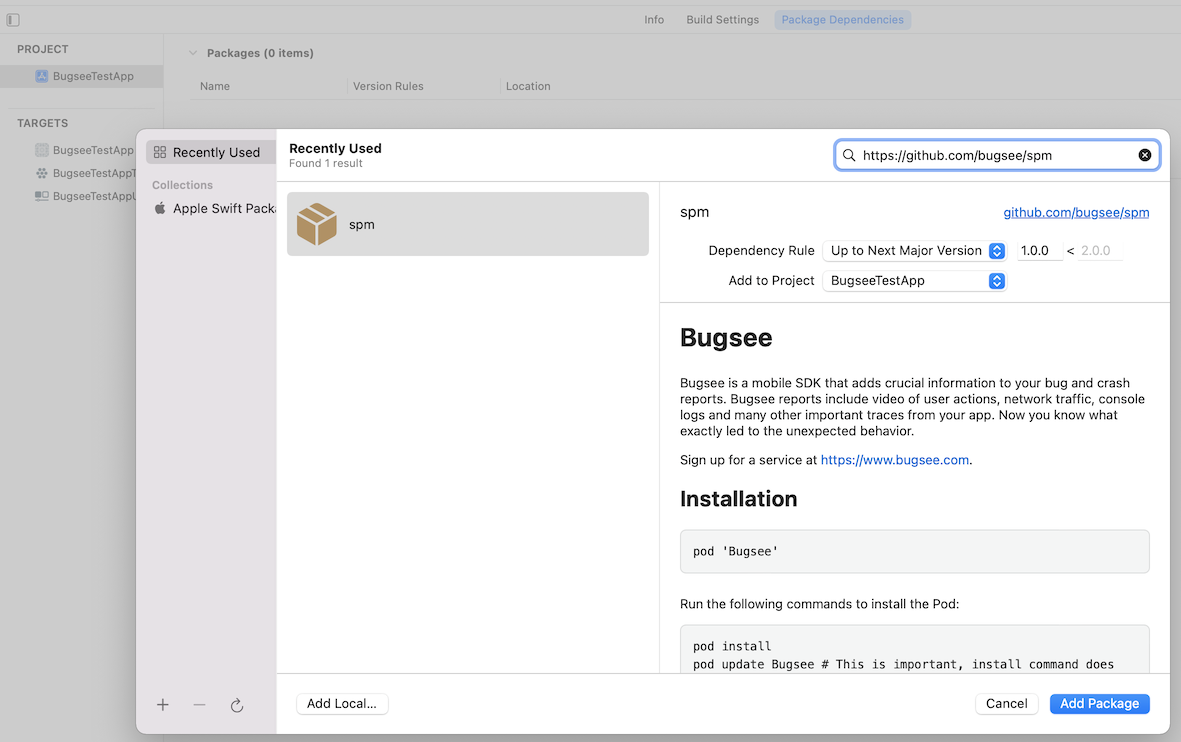
Swift Package Manager
Navigate to the SPM section in your project, add a new package, point it to
https://github.com/bugsee/spm
and select the latest version.
Carthage
Add the following line to your project’s Cartfile.
binary "https://download.bugsee.com/sdk/ios/dynamic/Bugsee.json"
Run the following commands to update the library.
carthage update --use-xcframeworks
Drag Bugsee.xcframework from Carthage/Build to your project’s Frameworks, Libraries, and Embedded Content section in Xcode.
For more information refer to Carthage Documentation
Manual
Download the latest version from here and extract it.
Copy Bugsee.xcframework to your project by drag and dropping it into the right location:

Initialization
Since v6.0.0 the Bugsee iOS SDK supports the simulator; crash capture is excluded. For full functionality, launch your app with Bugsee on a real device.
Locate your app delegate and initialize the framework in the application:didFinishLaunchingWithOptions method:
- Objective-C
- Swift
@import Bugsee;

//...

- (BOOL)application:(UIApplication *)application
    didFinishLaunchingWithOptions:(NSDictionary *)launchOptions {
    // ...other initialization code

    [Bugsee launchWithToken:@"<your_app_token>"];

    return YES;
}
import Bugsee

//...

func application(_ application: UIApplication, didFinishLaunchingWithOptions launchOptions: [UIApplicationLaunchOptionsKey: Any]?) -> Bool {
    // ...other initialization code

    Bugsee.launch(token:"<your_app_token>")

    return true
}
Debug builds
If you want to build and enable Bugsee only in debug builds, there are a few things you need to do.
If you are using CocoaPods, add the following line to your project's Podfile.
pod 'Bugsee', :configurations => ['Debug']
For SPM or Carthage, exclude the Bugsee dependency from release configurations in your Xcode build settings.
Then you have to wrap every reference to Bugsee in your code with conditional compilation flags as the following examples show:
- Objective-C
- Swift
#ifdef DEBUG
#import <Bugsee/Bugsee.h>
#endif

// ...

#ifdef DEBUG
[Bugsee launchWithToken:@"<your_app_token>"];
#endif
#if DEBUG
import Bugsee
#endif

// ...

#if DEBUG
Bugsee.launch(token: "<your_app_token>")
#endif
TestFlight builds
It makes sense in some cases to enable Bugsee on builds distributed through TestFlight but keep it disabled on builds distributed through the App Store. There is an easy way to detect a TestFlight build at runtime. You might come up with a more complex use case where Bugsee is enabled for both TestFlight and Release builds but with different configuration options. The example below shows a simple case of completely disabling it in the production build.
Application crashes can be intercepted by the system instead of Bugsee for builds installed via TestFlight. You can disable "Share With App Developers" system option on test devices in Settings > Privacy & Security > Analytics & Improvements.
- Objective-C
- Swift
- (BOOL)application:(UIApplication *)application
    didFinishLaunchingWithOptions:(NSDictionary *)launchOptions {
    // ...other initialization code

    if ([[[[NSBundle mainBundle] appStoreReceiptURL] lastPathComponent] isEqualToString:@"sandboxReceipt"]) {
        // We are in TestFlight, enable Bugsee!
        [Bugsee launchWithToken:@"<your_app_token>"];
    }

    return YES;
}
func application(_ application: UIApplication, didFinishLaunchingWithOptions launchOptions: [UIApplicationLaunchOptionsKey: Any]?) -> Bool {
    // ...other initialization code

    let isRunningTestFlightBeta = Bundle.main.appStoreReceiptURL?.lastPathComponent == "sandboxReceipt"
    if isRunningTestFlightBeta {
        Bugsee.launch(token:"<your_app_token>")
    }

    return true
}